Understanding Your New GoPro

So you got a new GoPro HERO3 Black Edition! Luckily for you, GoPro has added about 137 different filming options so you’ll never really be sure if you’re using the right mode for the activity/film job.  Hopefully I can break it down a bit and unshroud the mysteries of the modes.  Keep in mind this is written for the slightly technologically inclined.

A few things need to be explained when talking about the technical aspects of video resolutions, framerates, and video quality.  In digital video there are a lot of different variables that go into what makes up the overall IQ (image quality). 1080P on a GoPro is FAR different than 1080P on an Alexa – and it’s not just the image sensor that makes it different. Processors in cameras are a huge determinant to how video gets from the sensor to the SD card. There are tricks and shortcuts that can be made to ensure the camera pumps out all the different modes we want in the end.

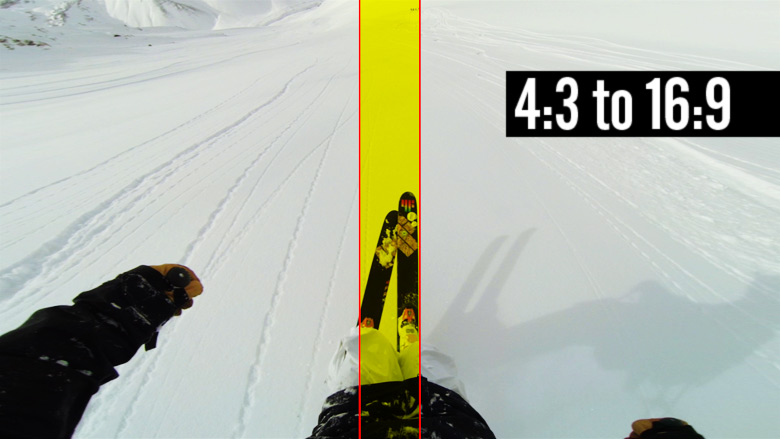
Starting with the sensor, the camera is told to read a certain window of the overall sensor – the bigger the window, the more taxing it is on the processor.  Reading the full sensor means you’re getting the full view coming from the wide angle lens of the GoPro.  The sensor in the HERO3 Black edition is 12MP with a 4:3 aspect ratio.  For 4K in the GoPro it’s reading the full width of the sensor, but not the full height – it’s capturing a 16:9 portion of the middle of the 4:3 full sensor.  Since the final delivery is 4K, it doesn’t have to scale that initial capture at all. This capture window is identical for, say, 1080P Wide; however, it scales it down to 1080P for the final output.  The final output size also has a say in processor taxation – we can get 4K at only 15FPS, while we can do that same capture window but scaled to 1080P at 60FPS.

When we talk about digital video sometimes we use the term native to the camera or not.  In the HERO3 Black the camera can capture that full wide 16:9 window, scale it to 1080P and do that natively 60 times a second.  1080-60 and 2.7K are just about the most optimal modes in the camera that really show the true power of the sensor and processor combo.  There are some modes in the camera that are read off of the sensor slightly differently which will end up showing some aliasing (jagged edges).  Take 1440 for example – look at 1440-30 at full resolution and compare it against 48.  The way 48 is read and processed is slightly different than 30FPS to get that large of a resolution combined with a high frame rate. You’ll see the same type of thing in a Canon 7D when looking at 1080P at full resolution compared against 720-60 at full resolution.  Canon’s 720P will have jagged edges because of the way they process the image to get a high frame rate from such a large sensor (high pixel count).
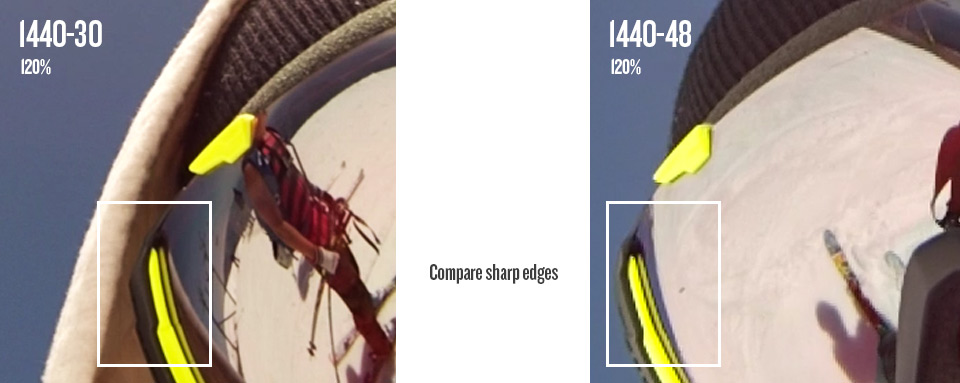
1440-30 vs 1440-48

Let’s talk about sensor window captures and fields of view (FOV). This is where the Medium & Narrow FOVs come from.  1080P Medium only captures a window in the very middle of the sensor, meaning we don’t see the full wide angle of the camera lens – only that middle slightly distorted part. The raw capture is still larger than 1080P, so it still scales down after the capture.  1080P Narrow is an even smaller capture window at the very very middle of the sensor so the distortion is even less.  By this time, the capture size is nearly equivalent to the pixel size where we are reading nearly 1920 pixels by 1080 pixels (remember the full sensor is 4000 pixels wide by 3000 pixels tall). In this narrow mode it’ll appear fuzzier since the pixels are very small on the sensor and are accompanied by a decent amount of noise.  When we are reading more pixels there are image processes that are done to clean up this noise – and scaling helps a lot. With no scaling, the narrow mode is extremely zoomed in from the original (imagine grabbing the middle 30% of a gopro photo – that’s what your full 1080P video will be). This is very different from digital zoom because the final readout is still native, we’re not digitally increasing the video capture size at all.
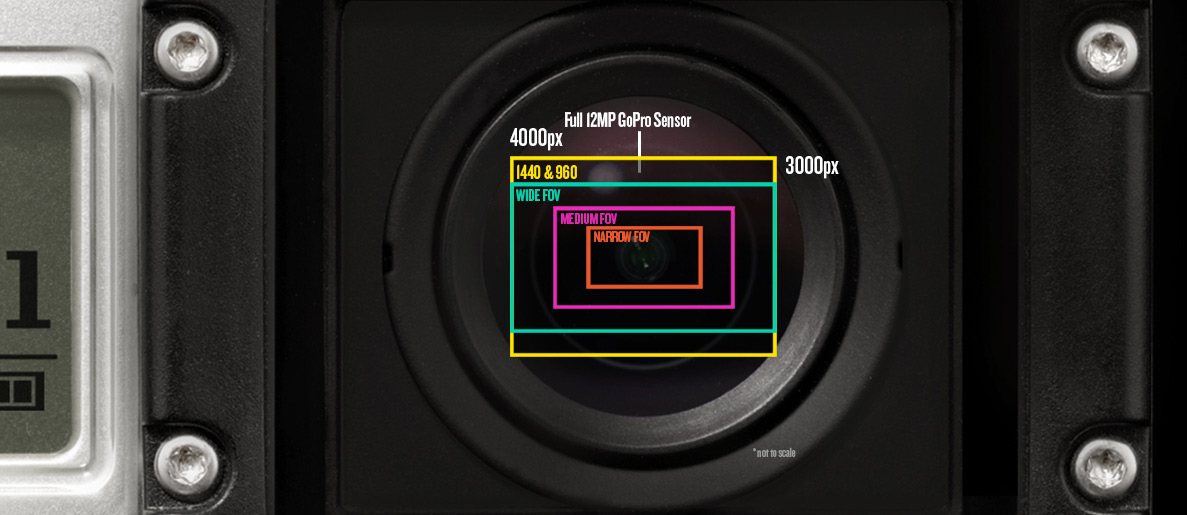
HD3_LensCrops

Now that a few of these details have been explained very briefly, let’s take a look at all the modes below:
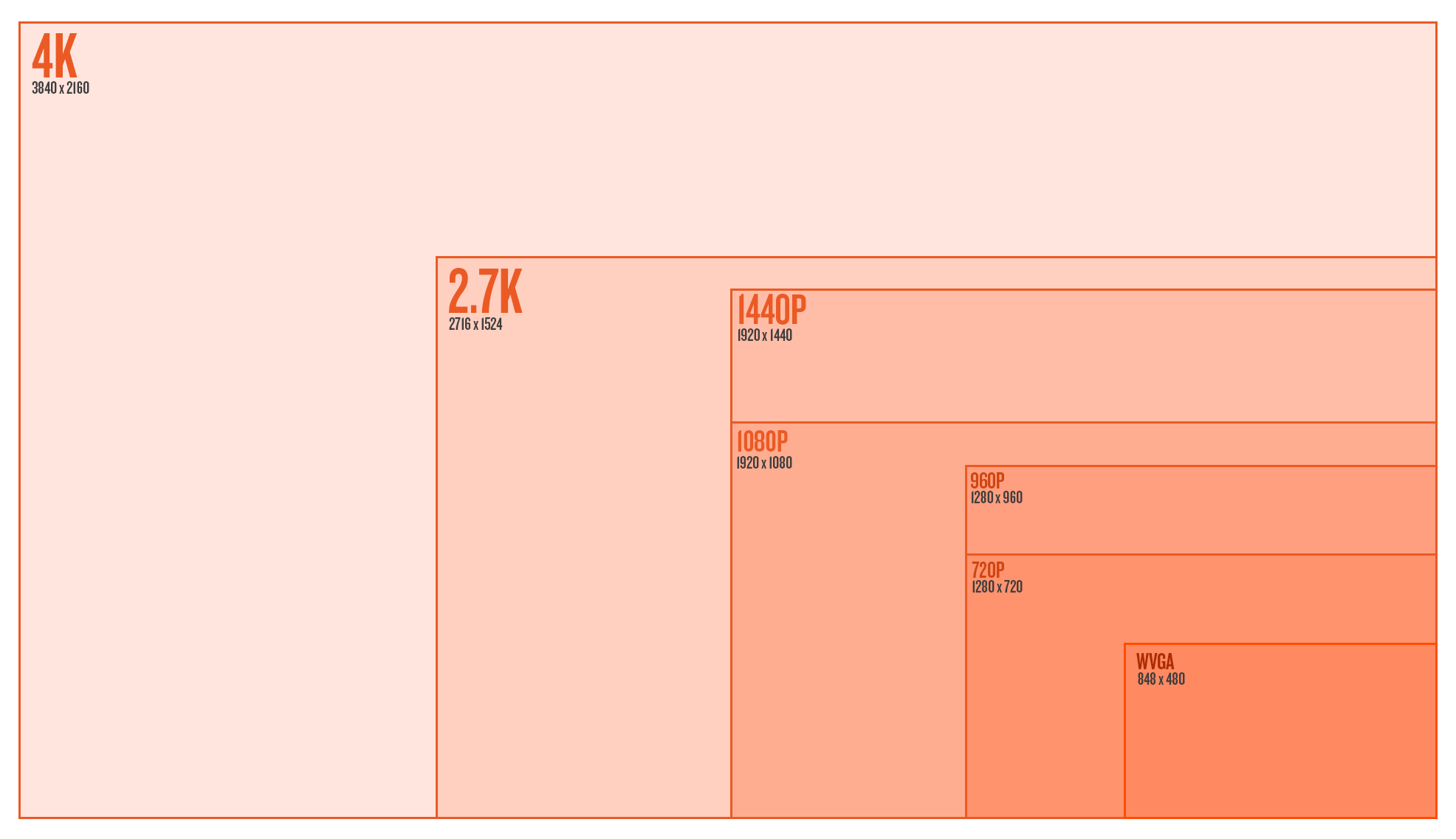
HERO3 Resolutions

Abe’s Personal Reviews of the Modes

  • WVGA 240 Wide
    Well, it’s WVGA – If you look closely at the image it’s not very clean – aliasing is present.  The novelty of 240 FPS is pretty cool if you don’t care about image quality when stacked up against some of the other modes.  It can look decent by itself when posted on YouTube.
  • 720 60 Wide
    Looks great, but why don’t you try using 1080 60 Wide instead
  • 720 120 Wide
    This mode is tough for me to like.  You’ll notice jagged edges in this mode when looking at full resolution so it won’t even compare to 1080-60 wide – the way it was scaled and read off the sensor gives some aliasing.  It looks great on the web on YouTube – if that’s your final output, go slowmo crazy.
  • 720 120 Narrow
    Bingo. 120 FPS? Check. No lens distortion? Check. Clean image without aliasing? Check! If there’s any mode in the camera that screams “I’m not a GoPro!” it’s this one.  It looks like a 50mm lens and is a clean image.  Slow mo is rad.  This mode is great for web as well.  Blown up next to 1080 or 2.7K, you’ll notice the softness that comes from the Narrow FOV.
  • 960 48 Wide
    I’ve never even tried this mode.  I bet it looks good.
  • 960 100 Wide
    I feel similarly about this mode as I do 720-120 Wide.  With this mode there is the opportunity to gain a bit of resolution by stretching 960 to fit to 1080 and dynamically stretching it.  Either way, this mode will have slight jagged edges when looking at full resolution.
  • 1080 30 Wide
    I did a test where I filmed the same scene at 1080-30 and 2.7K 30. When 2.7K 30 was scaled down to 1080, the details and sharpness were just about identical to 1080-30. So this one gets my full approval; however, you have to ask yourself, why not film this at 2.7K 30 and have the extra resolution if you need it? Either way, 1080 30 Wide is one of the cleanest modes in the camera.
  • 1080 60 Wide
    Comparing 1080 30 & 1080 60, you’ll see 60FPS is ever so slightly softer than 30.  It’s not something you’d ever notice even scaling the image to 720P or viewing on YouTube, but there’s a slight difference in the way it’s processed.  At the end of the day, 1080-60 W is my go-to mode for 90% of filming action sports.  With 60FPS you’ve got reduced rolling shutter as well due to reduced exposure time.
  • 1080 60 Medium
    This mode rocks. It’s very clean, doesn’t look super GoPro-ie, and is in slow mo.  Consider this mode for sweet slider dolly shots, glidecam, or cranes.  Try it for car mounted shots.  Careful with the POV with Medium or Narrow as you’ll get shakier and more disorienting.
  • 1080 60 Narrow
    This mode is very cool.  Still a very clean image; however, at this level you’re going to see more of the pixel noise & artifacting. You’re close to pixel levels without scaling so sensor noise could be an issue at lower light levels.  Also details will be softer overall.  The narrow FOV looks like DSLR video, very unique to GoPro.  Fun fact – we actually pulled out a few 1080-60 Narrow shots from the HERO3 reel because your average joe may see it and assume the video wasn’t fully shot on GoPro.
  • 1440 30 Wide
    I love this mode! First off, it’s VERY sharp and very clean.  It really gives you a sense of real POV when you wear the camera on your head, chest, or bite it in your mouth.  It can be a pain to deal with, as the aspect ratio is 4:3, but if you know the anamorphic 16:9 dynamic stretch tricks, it can be wonderful.  If you’re filming POV to just keep to re-live life later, this is a rad mode to use.
  • 1440 48 Wide
    The high framerate is great, but when looked at full resolution, you’ll see some aliasing.  The way the image was processed to get high framerate produces some jagged edges.  Thankfully, hardly anyone watches this at full resolution so jagged edges are harder to pickup.  This mode still looks great online and scaled down.
  • 2.7K 30 Wide
    This mode is insane.  Here’s what I like about it – sharp as a knife, full sensor wide, full 30 fps, native to the camera.  The one downside is rolling shutter since it is a 30FPS mode.  If you can get it mounted to something steady, at high speeds or low light you’ll notice really nice motion blur with this mode.  The high resolution makes this ideal for cropping and re-framing, or stabilizing in post.  I find this mode has great low-light as well.
  • 2.7K 24 CIN
    I’ve never used this mode.  It’s simply 2.7K 30 Wide with top and bottom chopped off a bit.  You’re not gaining anything by filming in this mode other than the ability to record at 24FPS.  I’ve requested 2.7K Wide in 24 FPS as well so 2.7K CIN isn’t the only option.  We’ll see, but not sure how that missed the initial spec sheet.
  • 4K 15 Wide
    Haven’t used this mode really.  I should try a timelapse soon, but that’s about all I can think of for this mode – timelapse, conform to 30FPS later.  Don’t make a video at 15 FPS unless you’re highly stylizing it and know what you’re doing.
  • 4K 12 CIN
    Hmm.. not sure about this.  Again, just 4K with top and bottom cut off and reduced framerate for the cinema kids.

Protune

This is one of the great mysteries to the general public, but amazing for film professionals.  Most noticeably is its flat color profile. It’s got special curves in the color matrix to pick up shadows more and not blow out highlights.  It also produces very muted colors that can later be color corrected to better match video from other cameras. Next on the list is the lack of sharpness.  You might look at the video footage and think it looks much softer than standard video or that something must be wrong with the lens.  The sharpness you see in the standard modes is actually all digitally added.  For film professionals, the less digitally added stuff in-camera, the better.  It can always be added later and edited to match the sharpness of footage coming from other cameras.  Next is the high bit-rate.  It films up to 45mbit.  Bit-rate levels essentially tell the camera how much data it’s allowed to pass on from the sensor to the SD card – higher bit-rate equals larger video files but is much more high quality.  Low bit-rate will use compression techniques to lower file size by grouping large blocks of colors.  Last on the list of ProTune is the ability to choose color temperatures.

  • Auto
    This is my go-to when using ProTune.  The camera does a great job of reading color and light and correcting for that.  This will give your footage a consistent look and color across the board for seamless footage, especially in snow.  I can provide some insight about what the other color temperatures do but I really haven’t used them much at all.
  • 3000K
    This should be used for very warm light such as early morning sunrises or sunsets.  In a neutral environment (white room indoors) the footage will look pretty blue to offset the warm tones.
  • 5500K
    This should be used for average daylight around noon when it’s harsher and a little cooler light.  In a neutral environment it will look slightly warm.
  • 6500K
    This should be used for colder overcast skies, it’s even warmer in a neutral environment.
  • Cam Raw
    This won’t add any color balancing correction and just spit out what the camera sees in any given condition.  Truly this will give you the most freedom for correction for later, but it could be quite cumbersome as it will always spit out a slightly different hue depending on light and what it sees.

Some important downsides – Protune will NOT look better at night.  Right now the camera has quite a bit of digital gain when it’s dark (think auto ISO pumping) so you see more detail than you’ll normally see with a camera of this size.  This comes at a price, obviously, which is noise in the dark.  This auto gain coupled with the boosted shadows will really look like a lot of noise in pure dark.  You’re better off switching out of ProTune as soon as dusk rolls around.  Also the noise reduction in Protune is lowered almost entirely so you you’ll get more detail in the visuals at the cost of noise.  All this said, this sensor performs extremely well at low-lights for its size.  Eventually GoPro could add a gain control button which would lower all the added auto-noise at low levels.  This would make the camera look crisp and perfect at lower light at the sacrifice of seeing more of the visuals in the dark.

In summary, for me – ProTune + AutoWB + 1080-60, 2.7K, 1440-30 & 1440 48 is my jam.  Experiment with 720-120 Narrow, 1080-60 Medium & Narrow as well, they are super cool.

EDIT: Here’s a handy chart Lewis Walsh created summarizing my review of the modes, thanks Lewis!  http://lewiswalsh.com/gopromodes.pdf

  • William Stauffer

    Thanks for the insight and advice, Abe. Looking forward to experimenting with some of the 137 new options!

  • http://www.youtube.com/user/Juliencv2400 Julien Ledermann

    Awesome Abe ! Thank you !

  • Fabien Le Goas

    So now I can correctly use my french GoPro ;) !!

  • http://twitter.com/CharlieRzadko cerzadko (@CharlieRzadko)

    Great post, it’s nice to read your opinions all on one page!

  • http://www.pdaleyproductions.com/ Pete Daley

    awesome entry. printing it out and putting it in my camera bag for go-to reminders tomorrow while boarding. really gonna give the camera an option run down and see what I like for myself… Next step if figuring out how to get all the diff modes to match up so cleanly in vegas for editing so my videos can turn out like the demo reel did… sweet baby jesus.. you guys are so talented at what you do.

  • Victor Sättberger

    You’r the best! Thank you so much!!!

  • http://Robbertklunder.nl Robbert Klunder

    Thanks a lot for the info!
    Going to play around with the LUTs now:)

  • Mafghan

    Hi, great post! Have you tried the different picture modes? I tried timelapse with 1fps. When going from daylight in to a tunnel, the picture gets black. And if I start inside (not much light) and go outside to daylight, the picture gets all white. Is this something I can fix in the tools or is it something this camera cant perform?

    • http://www.facebook.com/abekislevitz Abe Kislevitz

      That’s a bug that’s being worked on right now. The exposure will lock on the very first frame for .5 sec and 1 sec modes so if you go into the dark it’ll be too dark and vice versa. Keep your ears open for a new FW update shortly.

      • Mafghan

        Thanks!

      • Zachary

        Is the fw easily downloaded to your go pro?

      • Timp

        Abe, following on from the question about .5 and 1fps stills, I bought a h3Black specifically to use over the side of a boat on a pole mount and take a series of stills of grey whales at 1fps. Is there anything special I should be setting and will I be ok pre expected firmware update??

  • Alex Ward

    Nice :D

  • Pingback: Great Post by Abe Kislevitz re all the modes of the H3 Black

  • http://www.facebook.com/bisdremis.konstantinos Bisdremis Konstantinos

    i realy admire your review that points out weak spots of the new HERO 3 ! althought you work for GOPRO you are unbiased !
    thank you for this review ! i will print this , to be my field manual :)

  • Koen

    Wow thanks abe! this information is perfect, nice sized information bits and the best way to learn something about the technique behind the device.

  • marcos

    So cool…

  • Steve

    Abe do you get buffering problems with your SIM card? My Hero3 stops recording after 4 seconds but only the first time after the camera powers up. Interested in your thoughts..

    • http://www.facebook.com/abekislevitz Abe Kislevitz

      I haven’t had that problem but I have heard of it. The engineers say try reformatting your SD card and see if that helps.

      • Steve

        Thanks man I’ll give that a try.

        • Leon

          It is because your SD card is too slow! i’ve got the same problem and had to buy a new one – > problem solved! :)

          • Alex

            I was getting very frustrated with the same issue. when I looked at my SD card I saw a few hidden unreadable files so i opted for reformatting and its been great ever since. It was on a class 10 card so I knew I didn’t need a new one.

  • runsren

    Nice, good info.

  • Hubert Baissac

    Thanks Abe! That’s all very helpful. Now I’m excited to go out and get some footage!

  • http://gravatar.com/toozler Andre

    Abe, what about for shooting underwater, specifically for diving? Any advice? Is there anything firmware related coming up to better address the WB issues and lack of red/oranges/purples at depth?

    • http://www.facebook.com/abekislevitz Abe Kislevitz

      That’s a tough one – I’m not really well versed in dive filming, but I assume physical dive filters will be huge helps, there are some 3rd party ones online. For the hero3 reel I had to do some serious color correcting to get the stuff looking nice, you’d be surprised :)

      • Hugh

        Second that – an underwater WB mode would be great. Filters do help, but they also reduce the total amount of light getting to the sensor.

        • Philip

          Someone posted a comparison of the Hero 3 AWB w/ and w/o a red filter on the hero 3 and the difference is quite substantial. The question is at what depth do you actually need the red filter.

          • Morango

            Yes, any filter will reduce the amount of light reaching the sensor, some more than others. Even with the H3 low light improvements, it’s still not there to deal with low light, that’s why some dive videos look a little too noisy due to the camera setting a high ISO to compensate. These filters at http://dive.eelvision.com look promissing in terms of light transmission.

    • Philip

      Check out the red filter for the Hero 3.

  • Hugh

    Thanks for this, very helpful!

    Do you have any comments on the relative quality of 50 vs 25 FPS for those of us in PAL regions?

    Also, do you get a benefit in low light by using 25(30) fps versus 50(60) due to longer possible shutter speeds?

    • http://www.facebook.com/abekislevitz Abe Kislevitz

      50 vs 25 will be similar results as 60 vs 30. Also yes, in theory you’ll get better light performance with slower framerate; however, the quality of this sensor is such that the benefits may be nearly unnoticeable

  • http://cineform.blogspot.com David Newman

    Hi Abe, there is a reason to shoot 2.7kcin (other than 24p), it is wider, using a 4096 sensor region rather than 3840.

    • http://cineform.blotspot.com David Newman

      Visit HTTP://CineForm.blogspot.com to way shooting Protune at night can be cool.
      See the article titled Rethinking Time-Lapse.

  • Andreas K

    What do you mean by anamorphic stretch tricks. How do you treat the 1440 footage? Crop into it or stretch it?

    • Mikael G

      +1 for that question!

  • Pingback: Great Post by Abe Kislevitz re all the modes of the H3 Black

  • http://twitter.com/Kash_Shaikh Kash Shaikh (@Kash_Shaikh)

    Awesome bro.

  • Pingback: Best settings for slow motion?

  • Woytek

    Hi Abe, I like your video’s a lot! I am going to try my first GoPro (black) on the slopes of France coming February. But before I do that, I want to properly know my GoPro. Great article!

    I intend to shoot in protune and use post to produce a high quality movie. Therefore I was wondering if you could post a bit more info on different bitrates and also indeed binning and skipping. I would be very interested in an even more technical approach to which modes to use and which to avoid.

    Next to this I also have a specific question about framerates. What framerate do you usually produce your movies in? I think it would be nice to make my movie in 24fps and use the 1080p60 for slomos (factor 2.5). Also for low light and high detail shots I want to use 2.7k24 so that I can crop and scale for maximum detail. BUT, I cannot use 2.7k24, only 2.7k CIN can be used with 24fps but then the resolution is all wrong… Solutions? Will there be a 2.7k24 mode soon??

  • Bart – Netherlands

    Thanks! Very informative.

  • Peter Törnestam

    very informative and save a lot of trial&error / R&D for us readers. Had the 4K in mind for stillgrabs but will compare w your fav 2,7 instead.
    Thank you.

  • Pingback: [Sammelthread] GoPro HD Hero2 & Video Thread - Seite 4

  • Joe

    Abe, do you still edit with FCP7 or did you switch to X? or perhaps Premiere Pro or Media Composer? Any preference?

    • http://www.facebook.com/abekislevitz Abe Kislevitz

      I do about 30% in Premiere Pro, 70% in FCP7 still

  • Blade Runner

    Great article and facts I didn’t know before (like the jagged edges just caused by different framerates!).

    I just wonder one thing about Protune: I see the point of flat color-output, not sharpening that much in camera and high bitrate… But you also wrote “It’s got special curves in the color matrix to pick up shadows more and not blow out highlights.” > In what I’ve seen so far, comparison videos on YouTube as well as a very first own test, highlights seem to be overexposed in difficult conditions just the same way with Protune as without. I couldn’t see any better handling of highlights in Protune yet. Are you sure Protune can be of help when it comes to reduce blown out / overexposed skies or snow? I can understand and agree on everything else though…

  • Pingback: GoPro Hero3 Silver Settings

  • http://goprovideos.com Travis

    I love my hero 3 black edition. Such an upgrade from the 2!

  • Pingback: URL

  • Albert

    Hello, thanks for the very useful infos!
    However, regarding your advice about NOT using PROTUNE in low light, it directly contradicts what David said in the Cineform Insider:
    http://cineform.blogspot.com/2012/10/why-i-shoot-protune-always.html and http://cineform.blogspot.com/2012/10/protune.html , namely that you always get a better quality image (if not necessarily a more detailed one in low light). Do I miss something? I mean, we can always shoot PROTUNE and apply our own denoising &sharpening in post if we want, right? Thanks!

    • abekislevitz

      The problem I was seeing was people using ProTune at night comparing HERO2 with no ProTune with the results of ‘HERO3 looks awful at lowlight!’ If you know what you’re doing and want to process something to the max, I’m sure you can get decent results. I haven’t been as successful correcting night-time ProTune footage compared against just standard non-protune at night

      • Chris Fiore

        Two words: Neat Video! It’s pretty insane how well it gets rid of noise. Also has built in sharpening to regain a bit of detail. The only mode it kind of chokes on is 4K. There’s so much data from the noise, even in Protune the compression artifacts are very noticeable and hard to remove. Up to 2.7K is fine, though.

        • http://twitter.com/kriscad kriscad

          i agree, I use protunes along with neat video for my night shots and it does great.

    • http://www.facebook.com/makofoto Mako Koiwai

      I’ll have to do a comparison test, but I thought Protune looked very good in low light. It was VERY dark when I shot this test: http://www.youtube.com/watch?v=sVeYCl-_zfU

  • http://alexsladephotography.co.uk Alex Slade

    Couldnt say thank you enough! Video isnt something I have a huge knowledge on and figuring out all these modes and what was best was tiring! Thanks for doing it for me, its a great help to me and I would assume hundreds of others!

    • http://www.facebook.com/abekislevitz Abe Kislevitz

      No problem Alex, thanks for reading!

  • Anton

    Wow nice article, makes me want to trade my white edition in for the black edition, wasn’t really believing that the black edition was so much better

    • http://www.facebook.com/abekislevitz Abe Kislevitz

      yes, the White edition is rad for the price but black is where you’ll see the cutting edge sensor/processor technology. It’ll be future proof for a while until technology catches up

  • RichardN

    Anyone know of something similar for the Hero 2?

  • spencer

    What mood would you recommend for under water?

  • http://www.gspvideo.net tom fraser

    My question regards GoPro Cineform Studio. I like the LUT that it adds to proTune footage, but I do not like the fact that it outputs my 2.7K footage as 1080 with no option to retain the original size.

    • David Newman

      That should change in the next version, presenting you will more export options. However, you are not limited to exporting from Studio, the AVI/MOV files will the LUT applied are compatible with a wide range of tools and you can customize an MP4 export as you need. I have used Adobe Media Encoder to control the bit-rate and resolution after doing my color correction in GoPro CineForm Studio.

  • Jae Lee

    what kind of memory cards were you using? what do you think is the minimum size (GB) required?

  • Farhood Hessami

    hey Abe, i was just wondering, what frame rate do you use for your slow motion shots (stuff like doing flips/rails)? and what percentage of the original frame rate would you slow it down to?

    • http://www.facebook.com/abekislevitz Abe Kislevitz

      Most of slow motion is shot in 1080-60, I normally slow it down to 29.97, so half speed.

  • http://www.brandsandparts.com joseph

    WOW thanks for the info…

  • Benjamin Arbour

    This was very helpful!

  • Rich

    Hey Abe,

    So I have the Hero 2, when I turn on Protune, the videos I recorded is super jumpy and it the video just skips plus it doesn’t stay on recording, but when I turn off protune to regular mode, everything is fine, is there something I need to set for protune?

  • eladbari

    Abe!

    Thank you for this post!

    1. About opening other people’s eyes to the option of 1440:
    You HAVE to make a short video tutorial in you youtube channel (=quick tip) covering step-by-step -how to Dynamically stretch your 1440 footage!
    [the snowboarding shots you used this trick upon-look ultra realistic in means of POV, so that the 1080p mode feels too cropped on top+bottom
    compared to it! feels really crammed!
    The real problem is ensuring the middle of the frame isnt distorted. And us, Premiere users, dont have that FCP special plugin you use for that :\
    What to do? I have no clue. Tried playing with cineform but its not clear what should be done in means of workflow. please consider a quick tip video
    for the sake of us all! :)

    2. About framerates:
    I was very excited for 24fps mode. And I dont know what you think of it, but, when I shot somewhat of a high-action shots [camera was mounted on
    my head, playing basketball] – then the footage felt SO stuttery that I felt nauseous watching it [never happend to me before]. Then I started to feel
    like the GoPro3 is a camera that’s only best for slow motion editing.
    Cause 30fps feels too much like video, and editing from 60fps or 48fps-slowed down to 50%-have the closest “film feel” as in the [normal speed] 24p.
    Feels bad, I must say, because it makes me give up the 24p look because if i do choose it-then i have to be aware of having more stable
    recording…and that sucks for a camera like a GoPro, which you should go crazy with and be care-free while youre filming.. :) that’s a pity..

    • Chris Fiore

      1. In After Effects, there’s a filter called Optics Compensation. It can completely remove any GoPro’s distortion. Not sure if it’s also available in Premiere.

      2.Stick a neutral density filter in front of the lens, and you can regain motion blur. There are also some plugins out there that will simulate motion blur.

      • eladbari

        Very interesting solutions, Chris!
        I’d give those a try, definitely!

        Basically, you say- edit normally @1440 resolution in Premiere> then move the final edit to After Effects> Open a 1080p Comp > resize the whole edit with “fit to comp” command> And then use that “Optics compensation” somehow on the whole edit.
        nice!

        About ND filter. I didnt really knew what theyre for in regards of the GoPro. In regards to a 5D dslr- they block light so you can shoot in shallow DOF, but with a fixed focus of the GoPro? I guess bringing back motion blur isnt its main use, but that’s interesting.

        P.S-Tried to use ReelSmart Motion blur on a 24p GoPro3 footage, but it didnt help that much. good idea to explore, though :)

  • http://blog.bigsnit.com Robert Ouimet

    Crap. I just finished laminating my own (sadly lacking) cheat sheet for quick setups in the field. Thanks for such a thorough and helpful article – love the camera so far.

  • Paul

    Great info Abe! Thanks for sharing out!

  • Pingback: GoPro3 Video resolutions and protune

  • Rico

    Amazing article. Thanks a lot.

  • Lewis Walsh

    Fantastic article. Only have the Hero 3 Black a couple of weeks and learned a lot from this. I’ve made a simple chart summarising it, for my own use. I’ve put it online here: http://lewiswalsh.com/gopromodes.pdf I don’t claim any copyright for this, and if Abe wants me to take down I will :)

    • http://www.facebook.com/abekislevitz Abe Kislevitz

      awesome chart! I’ll link it in the article if that’s cool!

      • http://lewiswalsh.com Lewis Walsh

        Very cool ;)

  • Chris Fiore

    A tip for people not using Cineform Studio: you can still use Technicolor’s Cinestyle LUT in most NLEs to correct the flat curve the same way Cineform Studio does. Makes the image look normal and resaturated without being too contrasty like standard footage. I use it in After Effects with Magic Bullet’s LUT Buddy (free).

    • http://www.facebook.com/abekislevitz Abe Kislevitz

      For sure, I’ve used cinestyle LUT in Resolve and it worked well

  • http://www.propertyskycam.co.za Louis Genade

    Just one question, Is there any way to not having the fish-eye effect on stills and videos, or can one only fix that by editing the photos afterwards? Many thanks! Louis

    • jake

      theres a after market case that corrects the fish eye distortion, i think thats your best chance and not have to edit it out

  • Dave

    Fantastic article thanks very much @abekislevitz!!! The diargrams really help to explain the way the sensor works on the multiple settings.

    One question for you. On a perfect powder morning: Blue skys, 2-3 foot of fresh snow, snowboarding with a gopro pole (filming myself),
    what setting do you advise? I would have thought 1080p 60fps, or 720p 120fps?
    However I also imagine If i use 1440/960 I might get more top and bottom in the shot — so that might be worth considering.
    Thoughts?

    • http://www.facebook.com/abekislevitz Abe Kislevitz

      Depends on what mount you’re using. If it’s POV on the head or chest, I would do 1440-30 or 48. If you’ve got a handle cam or a pole you’re shooting B-Roll with 1080-60 is the go-to.

  • http://xviart.wordpress.com 16ART

    Thank you very much for this great article!!!

  • Pingback: Shooting Test

  • http://www.artworknotavailable.com Keith Hopkin

    Excellent summary Abe, great job!

  • http://www.facebook.com/coreyray10 Corey Ray Wernecke

    any tips on the settings for photos?

  • Pingback: Understanding Your New Hero 3

  • http://www.facebook.com/CheshireVisions John

    What about the life of the battery? How long does it last on a single charge? & if you get the battery pack, how much more life does it give the camera if both are fully charged?

    • Chris Fiore

      People are getting between 1-1.5hrs depending on the settings they use. Add another hour or so for the Battery BacPac.

  • Jean

    This is really a great and useful article.Thanks a lot
    It would be amazing to have an article from you which describes the backside: all the workflow for post production (import in FCPX, cutting, then what do you do first ? matching with music, transitions…? then how do you export to AE and reimport in FCPX…?) I have not seen any article yet which describes all of this clearly …

  • Giorgio

    Hi Abe,

    this is a great guide thanks! I mainly use the GoPro to shoot Airline Airplane flight decks during day to day operation… I am currently working on a project that I will start shooting very soon, and it will be in all sort of lighting conditions. What mode would you recommend me to use? 2.7K or 1080-60? What about ProTune? The crispier the image is the better! :-) I know, quite a beginners question I suppose… do you shoot PAL or NTSC? there is obviously a difference in the FPS etc… but I will never be playing anything straight from the camera to the TV… it will always go trough post production and editing in the computer.

    Thanks for your help and for such a great article!

    Gio

    • abekislevitz

      Hey Gio, if your camera is mounted and you don’t need to slow it down I would shoot 2.7K in ProTune! I shoot NTSC but I’m in America where we don’t use PAL. I would recommend NTSC if you’re not doing TV stuff, you’ll have more frames!

      • Giorgio

        Thanks a lot!!!!! I’ll mainly shoot for Pc and Youtube at the moment… So i’ll go NTSC! Thanks man!

  • http://Www.collabor8.tv Paul Terry

    720p 120fps Narrow fov doesn’t seem to be possible with my hero3 black edition with pro tune with the latest update? The only option it gives me for fov is wide. The go pro website says 720/120 only support ultra wide and narrow fov. I’ve tried using NTSC and also pal but I don’t have the option to change fov from wide to narrow. Any ideas why?
    Fantastic resource you have written here.

    • abekislevitz

      Right now Narrow is only available in non-ProTune. There will be a FW update in the future that will add narrow support in ProTune I’m sure.

  • Passang

    Hi Abe, small suggestion from you I was planning to buy Gopro HERO3 black edition and in Facebook I have seen many complain with HERO 3. So should I buy or wait ? Please help me thanks
    Passang

    • http://www.abekislevitz.com Abe Kislevitz

      There have been some problems with production and the FW but issues seem to be nearly resolved. It’s a great camera!

  • Ted Perkins

    Nice to see this information published. Thanks. Suggest incorporating the “Average Bitrate” chart from Wikipedia (where did they get this information?). Also, mention the full sensor width is 4096. David Newman mentions that 2.7K cin uses 4096 vs. 3840 sensor region vs. you called 2.7K 30 Wide “full sensor wide”. Is there a misunderstanding somewhere here?

    • http://www.abekislevitz.com Abe Kislevitz

      Hey Ted, you’re right about the full sensor being 4096 & the differences in 2.7K cin & regular. I didn’t want to dive too deep into the technicals because you really won’t see much of a difference in apparent resolution.

  • Frode Hernes

    Great article,
    Is the shutter speeds at various modes and fps documented anywhere? – What about low-light action like flood-lit snowparks etc, – any recommendation?

    • http://www.abekislevitz.com Abe Kislevitz

      It’s not I don’t believe. Lowlight like you’re talking about looks great. Anything between 30 and 60fps performs similarly and decent at lowlight with flood-lights.

  • http://goprohdherocamera.org Daniel Euergetes

    Wow! have I got a lot to learn! Wonderfully-done presentation here! You have me really wanting to get the black edition. I have not had my GoPro HD Hero 2 for very long and just yesterday I learned how to do time-lapse photography with that, at least now I know how to extend the time between shots!

    I will be coming back here occasionally to learn more about the different settings! Lots in these cameras and lots to learn!

    Does the Hero 3 Black Edition have a flatter lens? Not sure I like the fish-eye look of my results.

    • http://www.abekislevitz.com Abe Kislevitz

      Great! Yes the black edition has a redesigned lens that is wider and much flatter than the hero2 (less distortional orb-ing)

  • Pingback: local a louer

  • Pingback: GoPro 3 - Page 4

  • http://www.adzix.org adzix

    Excellent article, thanks for providing the information.
    I’ve got 2 questions, would be lovely if you could answer them.
    - do you ever use the spot metering?
    - would you please elaborate on the anamorphic 16:9 dynamic stretch tricks, if there’s a way to actually stretch the image so you don’t just cut away what won’t fit into 16:9?

    Oh and a third question if anybody knows: does the protune setting (as well as the spot metering) also determine the quality of still pics you take?

    • http://www.abekislevitz.com Abe Kislevitz

      I don’t use spot metering but it should be used when you want to get proper exposure outside of a car windshield when you are filming inside the car. For 16:9 cineform will do that for you, it is a bit more of an explanation than a simple answer, look at the H-Dynamic setting on cineform when you conform 1440 clips and force it to 16:9 1080P on conversion. Also ProTune will not affect your stills (at least it shouldnt. If it is it would only be the color profile, not quality)

      • http://www.adzix.org adzix

        Thank you, Abe. Will look into the H-Dynamic setting and also play around a bit more with the video settings.

  • Pingback: social media

  • Pingback: Understanding Hero3 Modes - Summary

  • Pingback: site worth

  • Pingback: latest mobile phones

  • Pingback: shower taps

  • Pingback: Probleme assurance auto habitation

  • Pingback: click this page

  • Pingback: go here

  • Pingback: GoPro HERO3 Black Edition – Der erste und zweite Eindruck

  • http://www.riot.ch Mathias

    2.7k sharp as a knife… i found other modes sharper.. Don’t know why, but 2.7k footage from inside a heli was rather unsharp. Also 720/100 seemed to be the best option to get as less rolling shutter (Jello effect)

    • http://www.riot.ch Mathias

      Here is a clip showing different modes of some Hero3 blacks mounted outside of a heli last week. https://vimeo.com/57927270

    • http://www.abekislevitz.com Abe Kislevitz

      Well yes, if you look at full resolution 2.7 will look softer, but scaled to 1080 it’s great. And yes 720-100 will definitely reduce rolling shutter as you’re pulling frames 100 times a second so there’s less movement during a single frame capture.

  • Dan Ivanovici

    Hello Mr Abe Kislevitz,
    I have Hero 3 black edition and I’m disappointed. First is the battery life, it is 60 min with the wi-fi on and 75 min with wi-fi off. I made this test at home, so the temperature was like 24 degrees celsius. What happens if I go to ski?
    The second is the overheating. When I record in video mode, the camera is getting so hot that I can barely hold it in my fist. The test was made without the housing at 24 degrees celsius. What it will be in the summer time when I’ll use this camera on my motorcycle, in the sunlight, in his housing, at 35 degrees celsius?
    I made the latest update, I have a 35 GB class 10 microSD from Kingston.
    I feel like I’m already sorry for my ex Hero 1 that I sold it.
    How is your Hero 3 working? Does my camera have issues?
    Thank you!

    • http://www.abekislevitz.com Abe Kislevitz

      Battery isn’t great, like you said, that time seems normal. It’s a powerful camera in a little package so it definitely gets hot. My judgement on a camera is mostly based on image quality which the HERO3 is far beyond any camera of its size. I can suffer the other downsides in exchange for impeccable image quality

  • Victor Perez

    What are the best video resolutions for underwater use ? and photos MP too ?

  • David S

    Hello Abe

    Lots of help for Video, can you extent your advice to stills as well? I would like to take aerial images to use in photogrammetric calculations of stockpiles. The camera is mounted under a UAV (wing).
    I have set the sensor area to medium to minimise the lens distortion at the edges, now I need to figure out how to reduce the effect of the rolling shutter.
    Your advice would be most welcome.

    • http://www.abekislevitz.com Abe Kislevitz

      Photos is an easy one – there’s only one setting that’s the best setting and that’s 12MP Wide. Any of the other modes just crop the 12MP photo – so your medium is simply doing what you could do on a computer to your 12MP wide photo. The only reason to ever use Medium or 5MP is if you’re short on card space for – say – a timelapse

  • http://www.rohicks.com Ryan O. Hicks

    Hey Abe how about revisiting some of the areas you didn’t try like “960 48 Wide” and updating the guide?

    • http://www.abekislevitz.com Abe Kislevitz

      That’s kind of a joke – there’s no need to film in 960-48 because 1440-48 looks better.

  • Rijk

    Hi Abe, sorry to bother you but I’ve been trying to figure this out for 3 days now..

    How do you process 1440p video in post production? When I try to import it directly into FCP X, I get a message saying “The video properties of this clip are not recognized.”. I then have to manually set the project’s properties (format and resolution), but 1440p is not one of the options. When I set it to 1080p, I lose a lot of detail in the video, and get black bars on the side. It works better if I change it to 1080p in Cineform first, but again I seem to be losing some of the detail.

    I want my video to be 1080p but I shot in 1440p because I read somewhere that the extra pixels help in stabilization. I don’t have that advantage anymore when I change it to 1080p in Cineform.. So now I’m confused. How best to do this?

    I also noticed the artifacts in the 1440p mode. Was wondering, do you know why is this mode the factory default?

    • http://www.abekislevitz.com Abe Kislevitz

      When you change to 1080P in cineform you aren’t losing that visual data so you’re not losing the ability to have the extra ‘stabilization’. You’re referring to getting more vertical height which will give the viewer a better POV experience. When you conform to 1080P it just squishes that down and you’ll have to use the H-Dynamic setting in cineform to stretch it out and make it look a little better.

  • PatDie

    is it normal that the gopro 3 BE gets really warm during filming? I acutally don´t have any thermometer, but after 30min of filming at 1080p/60fps/wifi on it is too hot to touch the display or the frame of the lense. Can´t imagine that this is compatible with the battery

    • http://www.abekislevitz.com Abe Kislevitz

      Hmmm, it’s definitely a warm camera and if you’re filming in warm environments straight for 30 minutes you’ll def see some heat.

  • Ted Pretty

    What is the best fisheye correction editing software for stills?

  • Pingback: Impressioni (prime) GoPro HD 3 Black Edition - Pagina 4 - DaiDeGas Forum

  • Adrian

    Great Post. Thanks heaps. I just lost my gopro 3 white edition on the bottom of a deep lake so I can only read about them for now which is killing me. But clearly it’s more reason to upgrade to the black edition. Fantastic info on the different modes though. Will have to start experimenting as soon as I can save up for another one.

  • http://www.delaa.pl delaa

    Abe – first of all – excelent article. But I got a question about as you caled it “native” modes of the cam. So if I switch to PAL in the setings of the camera 25, 50, 100 are my “native modes instead of 30, 60, 120 fps for NTSC ? Or 30 FPS as a base is only native mode of the cam and PAL 25 is prepared by the inside camera reprocessing ? Its affect on the quality (30->25 internal processing) if it exist of course ? TNX for the reply.

    • http://www.facebook.com/abekislevitz Abe Kislevitz

      Whenever we talk about 30,60,120 you’ll have similar processing for 25,50, and 100. There are no modes that are better or worse in PAL vs their NTSC counterparts

  • Dennis

    If 2.7k-30 records @ 45 Mbps in standard mode what is the advantage of using ProTune which also records @ 45 Mbps?

    • http://www.abekislevitz.com Abe Kislevitz

      Is it recording at 45 Mbps in standard mode? Well, if so, the differences are the ProTune version will have no sharpening and a flat color profile

  • Adam

    Hi Abe! Huge fan and love your style/technique. Looks like you had a blast at the X-Games! Some great shots you took.

    So, two questions. Just got a Hero3 Black Edition. Love it to death. Looking to do some skydiving with it. From your expertise, what would would recommend for filming? 1080-60 Wide or 1440-30 Wide? Also, when you import 1080-60 into FCP, do you set your project at 30 FPS and export at Apple ProRes HD? Because I would love for some day to have my video as crisp, clean and so real as this intro is.

    http://youtu.be/E9dbNx3FeY0

    I normally leave my project at 60 FPS in FCP and export in Apple ProRes HD but nothing looks like the above GoPro Video intro. Is the frame rate too high?

    I know you’re a busy man, but would love to hear your thoughts! Keep doing what you’re doing….we all thank you!

    -Adam

    • http://www.abekislevitz.com Abe Kislevitz

      Yo Adam!

      If you’re skydiving and you want to film other people, 1080-60 should work great. We use 1440-30 mostly for solid POV stuff where we really want to see feet, arms, skis, etc (more vertical view). When you set your project up, you’ll definitely want it in 30FPS (29.97) and conform your footage down to 29.97 from 60 to get good slowmo.

      • Adam

        Abe, you rock! Thanks so much for the response!

      • http://gravatar.com/ickyball ickyballs

        hi,,i purchased a gph3 black and i also purchased a ragecams 2.8 to 12mm lens mod,, i plan to swap out the gopro lens to the verifocal lens making the gopro a zoom focal lens camera.they are m12 lenses that gopro uses,,now there wont be any wide medium and small in camera zoom.so,,what does this mean to have optical zoom to this cameras sensor output??ill the sensor outputs be cleaner and will it film in higher pixel resolutions??the lenses are clear and crisp with no fisheye,,that is super now for indie film making which i am a film maker. what do you think of these type of lenses for the gopro 2.7k sensor.??

  • http://www.ricardolacombe.co.uk Ricardo Lacombe

    Abe. I’m a filmmaker from the non-sports field now utilising GoPro Hero 3 for a commission I have on a Great White Shark film in South Africa later this year. I wanna say that this guide and your comments are a lifesaver. I’m coming from a user of “normal” digital cameras for TV and film (Reds etc), but with so many shooting modes even I was a little lost on which yields best results. Keep doing what you’re doing man. You rule.

    • http://www.abekislevitz.com Abe Kislevitz

      Great to hear Ricardo! Thanks for the comment. Let me know when you get some Shark footage, would love to check it out!

  • Mattias N

    Really great post. Iam wondering why 2.7K 30wide is the ideal for cropping and stabilize in post. It still crops the picture so that you loose footage? Maybe its because it looks better if you are scaling it to 1080p?

    Is it necessary to convert the gopro h.264 files to Prores before editing? Or is it just because its way faster ? This is the part I never understand :)
    I have only tried editing the h.264 straight from the camera. It worked but was kinda slow and choppy.
    Should i convert it inside fcpx or with some other software?
    Some people say that I can convert to prores proxy just to make the files smaller but that will impact on the final render?

    • Brian Stokes

      Yes it is necessary. FCP does not handle H.264 well. Premiere Pro does better but i would still transode them first. If you are using Final Cut Pro, then DO NOT just drop the original H.264 .MP4 files into FCP. Convert/Transode them with 5DtoRGB (Free) or MPEG Streamclip (Free). I prefer 5DtoRGB. I personally use ProRes LT. Regular ProRes is good too but sort of overkill for GoPro HD footage. But just my opinion. LT is fine. Proxy is fine too for offline use and then using LT or ProRes later.

  • Pingback: Comprendre les 137 modes de sa Go Pro Hero 3 : STVii Production

  • Thorsten Moortz

    Very interesting post… read it several times for use of my H3 BE.

    But can anyone tell me the best performance settings in PAL?

    thnx :)

    • http://www.abekislevitz.com/ Abe Kislevitz

      They are the same as the NTSC counterparts.

      • Thorsten Moortz

        Thnak you very much, from Belgium…

  • Chaka22

    I just bought a gopro 3 black and when trying to view MP4 video only sound symbol is shown on computer screen. It captures the sound but now video. Any help. Trying to follow settings in manual but no help.

    • Thorsten Moortz

      Try formatting your SD card in your Hero Settings –> trashcan –> format

    • http://www.abekislevitz.com/ Abe Kislevitz

      try using VLC (videolan.org) it sounds like a codec issue

  • Jerry

    Very helpful stuff. As a gopro 1 user, I’m looking forward to upgrading to Hero3 Black so i can shoot in 2.7k then stabilize down to HD. But no-one can tell me what editing programm will do this for me! I would like to use Avid Pinnacle, as it has a good stabilizer, but I don’t think it could handle the 2.7k to start with. Can you help me?

    • http://www.abekislevitz.com/ Abe Kislevitz

      I prefer the warp stabilizer in after effects or premiere – it does a pretty good job

  • Brian Stokes

    Good stuff. I would love for you to do a visual screenshot comparison like how you did for the 1440 30fps and 48fps at 120% but for ALL of the modes. That would be nice. Thanks for the great write up.
    I have crossed over from using MPEG Streamclip to 5DtoRGB. Do you use any of these or just Cineform? I found the Cineform application created way to huge of a file size and although keeping the same look as the original .MP4 GoPro 3 Black file, it just seemed overkill. I think it had a higher bitrate than ProRes 422 HQ? Anyways… good write up, would love to see a 120% comparison for aliasing for each GoPro 3 Black Mode.

    • http://www.abekislevitz.com/ Abe Kislevitz

      Yeah, that would be helpful! I could go out with a tripod this weekend and shoot the same scene in all modes. We’ll see! I haven’t used 5DtoRGB but I do use streamclip regularly. You’re right about cineform creating large files – i know the most recent has a quality scale but I haven’t experimented with it much

  • Caleb Mac

    Great stuff. I noticed that when shooting in PAL, at 2.7kCin with Protune, my footage comes in as 23.976, according to Cineform Studio and AE. Is there a way to get true 24p?

    • http://www.abekislevitz.com/ Abe Kislevitz

      I’m pretty sure all of the 24 stuff comes out at 23.976

  • Hzak

    Hi Abe.Can you tell me what is the difference between PAL and NTSC encoding except FPS? Which encoding option do you prefer for GoPro Hero 3 Black edition?

    • http://www.abekislevitz.com/ Abe Kislevitz

      it’s just FPS! I prefer NTSC just because you get faster framerates and everything in the USA is NTSC

  • Benjamín

    HI, ABE! Greetings from México!
    I have a question and hope you can answer me.

    In your Tutorial about Final Cut Workflow, I see that you edited a video that is @50fps and you adjust it on Cinema Tools @23,98fps. This is PAL, right? Even if you’re on the USA it dosen’t matter if you edit them and upload to Youtube in the PAL code?

    So, what happend if I have footage in both, PAL/NTSC and want to edit them in the same Sequence? Also, I have them @24/30fps… I’m really confused about all this, sorry for taking your time.

    • http://www.abekislevitz.com/ Abe Kislevitz

      Nope, I film at NTSC but really for the internet it doesn’t matter. You can conform down to any framerate that you want and it will just play slower. The tricky part comes when you want full speed framerates that look good.

  • Pingback: GoPro Hero 3 Black Edition: обзор по личным впечатлениям и немного vs Hero 2 | Ергин Григорий

  • Mattias

    Is there any solution for the GoPro HD hero3 freeze issues ?

    • http://www.abekislevitz.com/ Abe Kislevitz

      As of right now the best thing to do is make sure your camera is up to date with FW. Also before you start filming go into the settings and format the card inside the camera. From here we’ll just hope the software team releases new FW over time that fixes things even further! Sorry about it, I get frustrated as well!

  • Frederik

    Hey abe! do you got any CC tutorials for your gopro films? They look so clean

    • http://www.abekislevitz.com/ Abe Kislevitz

      Yeah I’ve got an old FCP 7 coloring tutorial on YouTube!

  • Aris

    Which is the best setting for ski at for hd3 silver?

    • http://www.abekislevitz.com/ Abe Kislevitz

      Probably 960-48 or 720-60 !

  • Pete

    Abe.. I’m going to be shooting Lacrosse games, for coaches to break down film, using the GoPro Hero 3 3Black as a 2nd camera and mounting it to a football goalpost behind the net. Probably a good 20 yards behind the field of play. I need to get the whole field perspective so all the players are in frame. What do you suggest for settings? Thanks for your time

    • http://www.abekislevitz.com/ Abe Kislevitz

      Not totally sure – this sounds like maybe something for 1080-30 medium or narrow. Do you have the GoPro app? just check wide, medium, and narrow on the live preview when you set it up!

  • Vinnie

    What sequence settings do you use to export your video in 1080p? I am filming with the Black edition in 1080-60, but when I export my video and upload it to youtube, it is in 720p.

    • Vinnie

      (I’m using FCP7)

    • http://www.abekislevitz.com/ Abe Kislevitz

      Sequence settings are 1920 x 1080 ProRes. First step is checking your sequence to make sure it’s 1080. Next step is checking your compression settings and making sure that’s 1080! If that’s all good you should be good to go!

  • Phil Lemieux

    Hi Abe, I is it normal that I can’t fin ANY narrow mod in my settings? I did the last update.. I can’t find neither 720p 120fps Narrow and 1080p 60fps Narrow. Only got wide and medium for some. Thanks for your help!

    • http://www.abekislevitz.com/ Abe Kislevitz

      Sounds like you’re in protune. Right now narrow is only available in standard mode

      • http://www.facebook.com/pavel.masek.397 Pavel Mašek

        I have found combination 720p+narrow+protune, but it is only available via Gopro App – not in Gopro itself. I think bug to be fixed…

        • http://kaleidoscopeofcolor.com skiphunt

          discovered the same thing.. I can set protune narrow in 720 & 1080 if I set it via the GoPro app.

      • http://www.facebook.com/nikolai.rodin Nikolai Rodin

        Just found that 1080 60p Narrow is available via Gopro App, but you can’t choose that via camera menu, right?

  • Mattias

    Do you have any tips on how to get stable footage. Have u tried any glidecam stuff for the gopro? When using gopro on a pole, do you have the camera hanging under the pole/upside down mode in camera or do you mount it on top like most people? Ive heard that the footage will be more stable when hanging under the gopole since it hanging more free. Thanks for a great blog with lots of useful tips/tricks.

  • Cedric

    Hi, first I have to say: very good comment on everything about the new GoPro. Thank you for that. It is very helpfull.

    My question is about the spot metering, can you tell us a bit more about it, than the manual? Yesterday I shoot from the inside of a car and without spot metering the picture outside was better (not so overexposed). Which is strange, it should be the other way round. I guess it has to do with that, that the middle of the FOV was the Dashboard and NOT the window to the outside of the car. So i guess the spot metering makes only sense if the outside is exactly perfect in the middle of the FOV? Are you agree?

    • http://www.abekislevitz.com/ Abe Kislevitz

      Yeah that is my understanding. I don’t really know the technical details and don’t use it often (or ever)

  • Mike

    Hi Abe,

    will it flicker when i film in NTSC mode (60 Hz) in Europe (50 Hz) indoor with electric lights on?

    • http://www.abekislevitz.com/ Abe Kislevitz

      Possibly. Not sure what level of lighting will do it but we had x games lights in tignes do it last year at the half pipe competition under the lights

  • Rick

    Isn’t there a 24p setting on the Silver model? We shoot everything in 24 and would like to use some GoPro footage with it. 24???

    • http://www.abekislevitz.com/ Abe Kislevitz

      That should be available with ProTune turned on

  • Pingback: GoPro 3 Black Edition – Alex Hogue [Editing - Cinematography - Photography]

  • Niall

    Hi Abe, lets just say i wanted one and i bought it, which is what happened. im lost man, please advise the best all round average setting for the video on a helmet or pole mount. im not looking for award winning footage, just me and my mates messing on the slopes. cheers Abe

    • http://www.abekislevitz.com/ Abe Kislevitz

      1080-60 wide

  • http://www.facebook.com/pavel.masek.397 Pavel Mašek

    Hi Abe, great article! Only one thing I do not like on my GP3B is “blinking/flickering” in some situations due to changing of exposure. Do you have some info if Gopro will add Exposure lock function in firmware update? Issue is quite visible here http://www.youtube.com/watch?v=qFMCWAqY_Io

    • http://www.abekislevitz.com/ Abe Kislevitz

      Hey Pavel, exposure lock is something we can definitely do it’s just how to create a UI function to easily do so. In the meantime I have found that GBDeflicker works really well for things like this.

  • Zach

    I have a HERO3 Silver Edition and I want to use it for motorcycling (street bikes). What resolution/FOV would you recommend for this?

    • http://www.abekislevitz.com/ Abe Kislevitz

      If you’re doing it at night, use 960-30, daytime use that or 960-48 if you are talking about POV

  • shane

    Hi Abe, My gopro 3 videos have just gone from great to whats going on. the videos start good then I get a seqence of single shots then back to video. I havent changed any settings(I think) & all me saved videos are doing the same. Is this a problem with my computer or have I done something to the settings.

    • http://www.abekislevitz.com/ Abe Kislevitz

      Hummm.. on the SD card are you actually seeing video files and then photo files? Don’t really know what to tell ya without seeing the problem. Sorry!

  • http://www.facebook.com/people/Andrey-Fedorov/1319470804 Andrey Fedorov

    Hi Abe, first of all let me say thanks for such a great and useful post. There are plenty of modes in GoPro and your post really helps to find the relevant one for particular case. The question is – what do you think about using 720 120fps Wide instead of 1080 60fps Wide as a defalut mode for action? In this case it is possible to get “slower” slo-mo in postproduction. Are there any disadvantages in this mode? Thanks in advance.

    • http://www.abekislevitz.com/ Abe Kislevitz

      The disadvantage of 720-120 is just that it doesn’t look as good – it’s not just the difference in pixel count but the processing on 720-120 is different than 1080. That being said, I’m a stickler for image quality and if you’re not – go ahead and use 720-120! It’s radical

      • http://www.facebook.com/people/Andrey-Fedorov/1319470804 Andrey Fedorov

        Great, thanks for your answer, Abe!

  • Jeremy

    Hello Abe, thanks for the great site! I have a quick question regarding PROTUNE: You had mentioned,

    “Next on the list is the lack of sharpness. You might look at the video footage and think it looks much softer than standard video or that something must be wrong with the lens. The sharpness you see in the standard modes is actually all digitally added. For film professionals, the less digitally added stuff in-camera, the better. It can always be added later and edited to match the sharpness of footage coming from other cameras.”

    I know it might be a bit complicated to explain exactly but I was hoping for a couple of pointers in the direction of what you meant by you can add sharpness to Protune later. Are you talking about a sharpness filter or something else? I understand controlling the color temp, brightness, the darks, ect to make it look better in post, but I don’t understand taking something that Protune shoots and it looks grainy and soft detail and making it look sharp and clean with good detail in post. Can you please explain this just a little so I can experiment with this?

    Thanks again,

    Jeremy

    • http://www.abekislevitz.com/ Abe Kislevitz

      Yes, a filter is exactly what I’m talking about. Unsharp mask is the filter you’d use in after effects, there’s a sharpen tool in FCP, etc. It’s pretty basic and very easy.

  • Pingback: Understanding your GoPro Part 2

  • scuba 1

    Does anyone have experience scuba diving settings with the Go Pro Hero 3 with no additional light sources. I will be scuba diving in the Bahamas in a few weeks and wanted to use the GO pro

  • gopro4

    so my question is: if you put the mode on 1080p does it lower your battery faster?

  • Cedric

    Could you give as an overview about the 1080P Narrow, Medium 720P Medium etc. Scale thing?
    A picture where you can see in a second which Mode scales and which uses the full FOV and so on.
    That would be awesome to have on a shoot.

  • stefano

    hallo abe, thanks for your beautiful link. How to use narrow like a macro? I need for medical dentistry, i need to use 3d black, but there is not zoom? i can cut the narrow with Imove (apple), but still it’s too big view or not detailed. What can i do to have best results? 1080 narrow 24 is ok or not?.thanks
    stefano

    • http://www.abekislevitz.com/ Abe Kislevitz

      Hey Stefano! If you want to use the camera as macro you’ll need to add a lens adapter. Unfortunately the the stock lens will be blurry until about 60 cm away from any object. I saw this the other day – very cool! http://www.youtube.com/watch?v=-fP839p-QHw

  • wbenton

    First off thank you so much for this great article! I recently purchased my Hero 3 Black Edition in time for a ski trip ive been planning with some buddies. I was wondering what setting to use to get the best POV shots and which to use while filming my friends. My goal is to get shots that look as close as possible to what you see on the commercial. Also i want something that i can get good slow mo’s from. ANY information you could give me would be greatly appreciated. Thanks!!

    • http://www.abekislevitz.com/ Abe Kislevitz

      hey man! I would suggest reading through my review of the modes above! Should answer all your questions!

      • wbenton

        Can do, thanks for the response!

  • Victor

    Hi Abe,could you tell me which micro sd card do you use with your go pro?

  • Silvana

    I have a GoPro2 and generally I use the time lapse for surfing pictures. The shortest lapse is 0.5 seconds, right? Does this change in the Go Pro 3? I wanted shorter time lapses…Can I film and photograph at the same time? What resolution would I get if I take a snaphot from the movie mode? And what about zoom? If I choose narrow , it is closer? There will be a GoPro wth zoom?

  • Chuck

    Hi Abe I am new to this. I have a GoPro Hero 3 silver will the hero accessories like the battery bacpac work on the Sliver or do you have to buy the accessories just for the Hero 3.
    Thanks

  • Nicolas Garcia

    Thanks Abe, great explications. I’m a little bit disappointed about the 720p/120fps mode… But I’ll try with narrow fov.

  • Ajabond007

    http://www.youtube.com/watch?v=tVTPFlhVhxU&list=LL4IT_uO6Co8YEh14qt61nmA&feature=mh_lolz Hi what mode did you use to film that and did you use protune ?? Thanks

    • http://www.abekislevitz.com/ Abe Kislevitz

      This was filmed almost entirely in 1080-60 using ProTune.

  • Pingback: GoPro Hero3 Battery Life « Freewheel Cycle – Sales, Service and Rentals of Mountain, Trail, Freeride, Hybrid, Road, Tri, BMX, and Comfort Bikes – Serving Dundas, Hamilton, Waterdown, Burlington, Stoney Creek, Brantford, Oakville, Mississ

  • Ryan

    Great article. I have been looking all over the internet for this information. Thank you very much!

  • Ed

    Whats the best way to capture surfing? I tried both 1080 60 and 48 but I dont get the sharp water droplets and some distortion. Any suggestions? Using Hero3 Black

    • http://www.abekislevitz.com/ Abe Kislevitz

      1440-48 in ProTune and 960-100 in ProTune are both the GoTo surfing modes. 960-100 will be softer but will get more wave surfing action.

  • Techunsound

    Hey abe, quick question. I know nothing about cameras or technology, nor do i care to learn. I just bought the black and i am only going to be using it for fly fishing videos, dawn, dusk, day, and rock climbing, high wind environment. My main goal is to only turn this thing on and off, flim, unload on the computer. What would you say i should just leave it in at all times? 1080 x 60. And if i was going to change between 2-3 settings, high light in the afternoon, and at night around a camp fire, what would you say, just simple, on off, two buttons. Thanks bro!

    Trent

    • http://www.abekislevitz.com/ Abe Kislevitz

      I’d say 1080-60 in standard mode should be your Go-To all around setting for everything. If you want to get a little tricky at lowlight it might be slightly better at 1080-30 since you’re allowing slightly more light per frame.

    • http://www.facebook.com/imacfarlane1 Ian Macfarlane

      Trent! I just purchased the Black for the same thing. Strictly fly fishing. Where do you live and what do you fish?

  • Diver

    Hi Abe, what res-fps would you recommend for recording when diving in sea?

    • http://www.abekislevitz.com/ Abe Kislevitz

      Depends on how high-octane your diving is but 2.7K-30 would be great, as well as 1080-60 wide and medium! If you’re doing POV 1440-30 could be great.

  • Magnus Roaldset

    I am just about to buy the hero 3 black edition, and i am just wondering what MicroSD card you use and recommend for it to be able to record full resolution. how many mb/s?

  • d

    Thanks so much!!!!

  • oxband

    I want to shoot, and while I’m not sure I will go slo mo with the footage, I want the option. Is there a reason I’d want the 1080 60fps over the 1440 48fps in that scenario? Is it just a matter of how much I’d want to slow it down? I imagine 48fps will let me slow it down plenty (well, half the speed to be precise since I’m editing in 24fps).

    • http://www.abekislevitz.com/ Abe Kislevitz

      There is an advantage to shooting 1080-60 over 1440-48 but it depends on the scenario. 1080-60 is a much cleaner mode (image quality wise) and will look better full resolution than 1440-48. You’d want 1440-48 if you plan on utilizing the full height of the 4:3 size by skewing the video to 16:9.

      • oxband

        Hmmm….I don’t quite understand that. I plan on presenting what I shoot in 16:9. Does that mean I should stick with the 1440-48? I don’t quite get why the fact I’d be skewing it makes it better, although am I wrong in thinking that’s what you mean?

  • Pingback: GoPro et Action Cams : quelques conseils pour bien filmer vos sports d’hiver – Lense.fr

  • Anais

    I’m a 15 year old film amateur and this article just helped me tremendously! Thank you!

  • Tom

    Hi Abe. Thanks for the great tutorial. Just one question left: Did you use polarizer filters for your skiing videos/ Do you recommend polarizer filters for a sunny snowboarding day?

    • http://www.abekislevitz.com/ Abe Kislevitz

      I don’t actually. I tried them on the original HERO camera and it did wonders but since then the sensor has improved and captures the dynamic range pretty well.

      • Tom

        OK. Thank you very much for taking the time to answer all the questions

      • http://twitter.com/bernk Bernard Kowalski

        What about for filming under water? Is a filter worth it in that case? Do you know if one was used for the freediving scenes in the itnro?

  • http://www.facebook.com/kevin.amodia.1 Kevin Amodia

    Thank you so much… you were extremely helpful

  • Edi

    Just bought a hero 3 black a few days ago. This site helped me a lot to understand my new gopro. But what I’m missing is the 720p / 30fps mode. Is there any chance to have this mode in near future updates?

    Edi

    • http://www.abekislevitz.com/ Abe Kislevitz

      Don’t think so – I think the assumption is that you’d just use 1080-30. Times a-changin’

  • http://twitter.com/jay__wilson jay wilson

    I shot some test video mountain biking with a GoPro3 black @ 720p-59. The video looks great but after I edit it down using Premier Pro CS5, I see a very noticable difference in percieved resolution, sharpness, and smoothness. The project was set up to match the native file properties and probably the best export result was H264 (HDTV 720p 25 high quality). I’ve tried every conceivable other variant I could think of with slightly different results but still, when I go back to the native file, the original is so much better.

    • http://www.abekislevitz.com/ Abe Kislevitz

      Jay, could you possibly screen grab the original file and the after-exported file? Also a screen grab of your exact export settings would help as well :)

      • http://twitter.com/jay__wilson jay wilson

        Abe, I’ve attached a dropbox link for the native first frame sreeen shot and the edited MP4 test clip. The original full video is over 2G so I can’t attach that, but the first frame shows the difference.
        https://www.dropbox.com/sh/uecy2ld6lsoaabp/GOQ55Mp__a?m

        Also, see the posted (CS5 edit) YouTube: http://www.youtube.com/watch?v=5xjY7f3rDnM
        The editing is only trimmed and assembled, no other alterations were done. I know YouTube uses compression but other 720p GoPro youtube videos seem sharper. thanks, -jw

  • denis

    i have 32 gb memory card,the setting on 1080-60…and can only put 4 videos on it before it show “full”…then when i download them,its like slow motion,chopy,and skips,and not even the full video that was taped…getting my,thinking i wasted 400 bucks for nothing

    • http://www.facebook.com/abekislevitz Abe Kislevitz

      Do you have a Mac? On a Mac unless you empty the trash when you delete things off the card it will never delete. Try formatting the card in the computer with disk utility first. Also make sure your card is fast enough. Class 10 or UHS-1. Next the choppy video is because your computer isn’t fast enough or you’re playing over USB. Try copying the video file onto your desktop and use VLC media player.

  • Pingback: Need "guru" advice on playing with 4K

  • Rev Up Motors

    I am a classic car dealer and I purchased the Hero 3 Black Edition. I tried the “factory” setting and it seemed a bit choppy and very long to upload to my Mac. I just want my future customers to feel like there are in the drivers seat driving along. My videos will mostly viewed on YouTube, not on a big tv. I did purchase an SD reader to plug the card into to plug into the computer directly. I hear that speeds up the upload. What resolution setting would be applicable for my use? Thank you in advance!

  • george

    hi abe, i bought my hero black 3 few months ago and still thinking what setup to have. i use mine for fishing. should 1080-60 be the go?
    and also what do you recomend, 12mp wide, 7mp wide, 7mp med, 5mp med?

    thanks!!

  • Daniel J

    Hello, I got a basic question. I’m new to the gopro field and so I’m wondering if I can just buy one camera that can film all environments like snowboarding, cliff diving, water diving etc ? or are there alternatives for each sport ??

    • LeRoy

      the GoPro will work for all of those. they sell them as ‘kits’ that have certain mounts that are more applicable to certain sports, but the camera is always the same

  • Pingback: Settings...

  • Mr E

    Abe, I’m new to the GP Cineform software. How do I get a frame grab to use as a still?

  • LeRoy

    Thanks Abe, your site is awesome! Amazing information, glorious supporting imagery, all the high-tech stuff I wanted to know and it’s such an easy read.

    Wish I had read this article last week! Just filmed 4 days straight at mammoth.. and didn’t use ProTune :( which hurts me to know that I could’ve had more to work with in post..

    1) You mention that Cam Raw mode will tend to spit out ‘slightly different hue depending on light and what it sees’. Do you mean there is a greater variation in hue accuracy as compared to the other color balancing modes (Auto, 3000K, 5500K, 6500K)? If I plan on color grading every clip that comes in, this is the mode I want to be in, correct?

    2) If I bring a 1080p60 clip into a 30fps FCPX project will it retain it’s glorious 60fps information when I stretch it out for slow-motion?

    3) Do you know what Chroma Subsampling the GoPro Hero 3 uses, 4:2:2, 4:2:1, or 4:2:0? The Canon XF300 (a $6500 camera) has a bitrate of 50Mbps to GoPro’s 45Mbps (GoPro impressed me here) and the XF300 has 4:2:2 Chroma Subsampling. Does ProTune affect the Chroma Subsampling attribute at all? Something tells me I’d be getting better color out of a Canon XF300 but i’m sure its not very clear-cut to explain..

    Thank you again for providing all of this extremely useful information!

  • http://twitter.com/emination Emin Köklü

    Do you have a similar guide for GoPro Hero2?

  • Pingback: GoPro HERO3 Who has one?

  • Natalie

    HI Abe, Thanks for writing such an easy to read guide! What settings do you recommend for scuba diving? And do you think any of the optional accessories are necessary? Thanks heaps!

  • Pingback: Good basic GP3 info

  • Pingback: Low light video

  • Pete C

    2 questions: 1) what would be the best setting to capture underwater video footage? and 2) how long of video would I be able to record on a 32 gb micro HDHC card in that setting?

    Thanks!

    • http://www.abekislevitz.com/ Abe Kislevitz

      I think 2.7k looks great underwater (with protune Off so you get better low light and noise reduction). If you’re doing POV diving like head mounted 1440-30 is great. Don’t know about how much time you’ll get on that card – maybe an hour of recording time ?

  • Pingback: Abe Kislevitz - YouTubers You Should Know

  • timberscout

    I want nice crisp video on my 27in iMac i have been filming in 1080-60 wide and when i watch full screen it seems to not be as crisp how much will it help to film 2.7k-30 wide. I use imovie so 30 fps is about all it will take until i decide to get final cut pro. your thoughts? and thanks so much for all the clearification.

    • http://www.abekislevitz.com/ Abe Kislevitz

      2.7k will indeed give you a more clear image on your iMac; however of you are editing in IMovie you may be limited to 1080 so you’ll be throwing that high resolution away. The only way may be to play the raw files natively on the computer or use a different editing software with formats higher than 1080p

  • Minners

    Hi Abe…I have been filming some aerobatics in 1080 @ 24FPS. I can play the raw footage absolutely fine, however whenever I convert a file with CineForm, the playback Mp4 breaks up intermittently. I have experimented with Draft vs High quality etc and still seem unable to get something that will play on my laptops. The file plays fine if I upload it to You Tube or similar. Is this something that you have experienced before?

    • http://www.abekislevitz.com/ Abe Kislevitz

      Compressed MP4′s are the hardest video formats for a computer to play – its trying to decode every frame to play it on your computer. I recommend viewing the .mov cineform files on your computer. Try VLC player to see if that helps with the mp4

  • mSpider

    Hey Abe,
    The sensor is actually bigger than the 4k rectangle, right?
    What about the still photos?

    • http://www.abekislevitz.com/ Abe Kislevitz

      The sensor is taller than the 4k rectangle but not much wider. Stills are 12 mp which is the width of 4k but with a 4:3 aspect ratio

  • Pingback: New GoPro User with Questions

  • http://www.facebook.com/wladimir.moquete Wladimir L Moquete

    How do I export high res pix from video?

    • http://www.abekislevitz.com/ Abe Kislevitz

      I’m on a Mac – I like opening the file in QuickTime 7, then making sure the frame size is actual size I take a screenshot using cmd shift 4 space bar and click the video frame. I open that in photoshop and crop the frame off

      • http://twitter.com/bernk Bernard Kowalski

        Using QuickTime 7 you can just use cmd-c to copy the current frame and then paste it into Ps. No cropping required!

  • Quentin

    Hi, extremely helpful information which I am very grateful for. I must admit some of the more in depth tech stuff was beyond me but hopefully as my knowledge base grows it’ll get easier. I wonder if you can answer a simple questions for me. I sometime like to incorporate stills into my video footage. I’ll almost certainly do most of my recording at 1920×1080 @ 50fps (UK) so the aspect ratio will be 16:9. The stills modes on the Hero3 Black as far as I can work out are 12MP Wide FOV, 7MP Wide FOV, 7MP Medium FOV and 5MP Wide FOV, I understand from my initial trials that the aspect ratio of the stills will be 4:3 which will make combining them with 1920×1080 video awkward. When shooting in the “video+stills at xx time interval” the stills have a 16:9 aspect ratio, my problem is with stills shot when in “pure” stills mode. Am I missing something fundamental? What approach to this problem would you advise? Is there a button somewhere that sets the stills aspect ration to 16:9 that I’ve missed?

    • http://www.abekislevitz.com/ Abe Kislevitz

      The simple answer is to just crop the top and bottom off a 4:3 photo to make it 16:9 :)

      • Quentin

        :-) Thanks, I thought that might be the reply but that’s pretty tedious if it’s a time lapse series of hundreds of images is it not? :-(

        • http://www.abekislevitz.com/ Abe Kislevitz

          Nope, create the timelapse as 4:3 using cineform and then crop the one video clip in post. Just size it up in your editor so the width fills the video frame and the top and bottom get cut off. You can adjust the vertical framing for the most interesting part or even animate the vertical motion over time.

  • http://adrianocastro.net/ Adriano Castro

    Great article. Thanks for taking the time to put this together.

    Overwhelmed as I am with all the options, based on this write up, I jotted down these notes for myself:

    - For real POV use 1440 30 Wide
    - For super slow motion use 720 120 Narrow
    - For everything else use 1080 60 Medium or 1080 60 Wide

    I’d love to hear your thoughts on recommended modes (and just general shooting advice) for cycling and diving.

  • ss

    check out the new footage: http://seahawkaerial.com

  • http://www.facebook.com/ian.fischer.90 Ian Fischer

    Abe,

    You recommend 1080-60 Medium for car mounted shots and 1080-60 Wide for 90% of action sports. Can you explain why you recommend Medium for car shots plus any other recommendations for car shots inside and out do you have? I want the best possible video of course. Could you also recommend a program for Apple that is easy to edit on? All I have is iMovie.

  • Martin Perelman

    Hi Abe, I’m like Trent in that I just want to turn my go pro 3 on and start filming for snowboarding, snorkelling, fishing etc. I have set it to 1080 x 60 and when I play it back on my ASUS Ultrabook, the film freezes every 1-2 seconds. I’m playing it back on VLC media player. Have you come across this before? Is the resolution on my go pro 3 too high for my laptop to playback? Should I reduce resolution down? The recommended resolution on my ASUS Ultrabook is 1600 x 900 which us what I have it set too. Any help here would be appreciated.

    • http://www.facebook.com/people/Magnus-O-I/631950550 Magnus O. I.

      Hi Martin, I’m no expert on this, in fact I just got my first GoPro (3black) two months ago, and had NO prior experiences with such cameras. But testing/failing/succeeding I’ve also encountered problems with the footage “lagging” when played back on the computer. My PC is however 3-4 years old, so I fear it’s time to crack open the savings account :P
      Jokes aside, I find it best to edit the clips/videos in either Sony Vegas Pro (pretty straight forward & easy to use, just Youtube it) or GoPro CineForm Studio (free software from GoPro’s site), and then render them as .wmv -files instead of the .mp4 that comes with the GoPro. This makes for fluent, awesome playback on my outdated laptop, and it’s especially fun if you learn to edit text, cool video-features, transitions, slow motion etc ;)

      Good luck, hope it helps!

  • Patrick

    Hey man,
    If I were going to go off roading with my jeep and want to put this on the front bumper. Would 1080 60fps be the best ?

    • http://www.abekislevitz.com/ Abe Kislevitz

      1080-60 wide should do the trick

  • http://www.facebook.com/grant.steadman.37 Grant Steadman

    Mate – Awesome! Thank you very much. GoPro should pay you

  • http://www.facebook.com/grant.steadman.37 Grant Steadman

    Thank you!

  • http://www.facebook.com/Crow391 Aric Davilla

    Quick question. I am going kayaking in the ocean next week and I was wondering what would be the best video setting to have on my Hero3 Silver Edition? The settings I have configured right now leave the video choppy when I play them back on my laptop.

  • Stanziski

    Hello abe, thanks for sharing your knowledge, it is quite complicated but extremely interesting! This is why I would like to understand everything to exploit my gopro at its’ maximum! First, if you’re not doing slow mo, better lowering the pic per sec (fps if I understood) because you will get a better light etc, am I right? Therefore at normal speed the more picture you have the lower quality you’ll get? Secondly, narrow fov is interesting when the quality is not too high or the image will get fuzzier? And finally is 32 gb sufficient if I use my go pro for one week without deleting? Thanks a lot for your answer, it will really really help me!

  • Jason

    Abe, nice write up brother. Quick one….if my computer’s processor isn’t fast enough to keep up with the video format that I choose, how is it that I can watch insanely crisp high def videos on youtube from people who use the GoPro with no problem? I don’t know much about how all of this works. Tried using GoPros Cineform to convert some of the files I created and for some reason it’s not working.

  • Scott

    I was wondering how to change the time lapse intervals to 60 seconds?

  • Pingback: GoPro : Apprendre à mieux connaître sa caméra | YourCreation

  • http://twitter.com/YourAlaskaGuide Your Guide

    I have searched the internet looking for the settings that were used to film the northern lights and came across this site. Over the next couple days we are supposed to have some good auroral activity here in Alaska. I was looking for some advice on what settings to use. This site has some good advice and I am going to give it a whirl at 2.7K 30 Wide in my Black addition and see what comes out. Maybe you have some better advise, but my window for shooting is only about 2 to 3 nights as by then this event will be over.

    • http://www.abekislevitz.com/ Abe Kislevitz

      You’ll be really lucky if you catch any of the northern lights from a GoPro. Most videographers end up shooting long exposure photos and making a timelapse as video would rarely pick it up on any camera. You can try if you get a super bright event but I have my doubts :/

  • Jirby

    Great help! Thanks for taking time to provide article and feedback. Looking forward to testing different modes.

  • Tyler

    Hi Abe,
    Is it normal that when i try and view 1440 and up footage on my pc, it only comes out with sound? im hoping this is just my pc not being able to view high resolutions…?

  • Tyler

    Hey Abe,
    Great easy guide for those lost like me.
    Im unable to view 1440 and up footage on my pc. It only plays back as sound. Is this because my pc just cant display such resolutions?
    Thanks!

  • pierre 974

    Great advices Abe thanks a lot !
    I recorded most of my video on 1080-60, they play smoothly on WMP but on Premiere or Vegas Pro they are very laggy.

    No problem with a smaller framing.

    What software do you use for post edition ?

    • Bill McCarty

      Something I’ve found with DSLR footage in Premiere is that a QuickTime .mov or .mp4 compressed with H264 plays badly. If you rename the files (Bridge has a very easy rename feature) with an .mpg extension, Premiere doesn’t need to deal with the QuickTime wrapper and they play very smoothly.

      • pierre 974

        Thanks Bill for your input, unfortunately it did not change anything, I think it is PC-related.
        Anyway I will stop using Premiere as the ouput files are 100 times bigger than the source if I want to keep the original settings…

        • pierre 974

          Actually I was not using the best codec, I changed to h264 and now the exported file is even smaller than the original but the quality remains good.
          Only problem is that I cannot keep the framing at 59,94 or else I have to decrease the resolution.

  • Kurt_Kokkos

    Hi. Great article. Thanks. I have one question i hope someone has an answer too. I own the Hero 3 BlackEdition and are testing indoor filming. When i watch the clip the overall brightness is pretty dark. The strange is that the brightness are changing after approximately 2 sec and get’s darker. It look’s like something is activated making the clip unnecessary darker. The 2 seconds whith brighter film looks better and it would be great if the camera could stay in that mode. I’ve tried the modes 1080 60 Wide, 1080 60 Medium, 1080 30 Wide in combo with/without spot activated and with/without protune activated. The result is the same each time. I have the latest firmware installed (rel. 04.04.13) Any ideas folks??

    • http://www.abekislevitz.com/ Abe Kislevitz

      I have seen that in my filming as well – I’ll look into it.

      • Kurt_Kokkos

        Great. Hope you figure it out. :)

  • stranger

    Many thx and good luck!
    From Russia with luv.

  • Elvo

    Elvo’s personal review of the modes: there are too many of them. Abe should have picked his 3 favorites (1080 30 wide, 720 120 narrow, … 1440 30 wide?) and labeled them low, medium and high resolution.
    The remaining 134 modes should be hidden behind ‘Advanced Mode’ or something.
    Out of all the people I know who own a GoPro, most know what a resolution is. About half know what frame rate means. FOV, WB, AR? White ravens.

    • http://www.abekislevitz.com/ Abe Kislevitz

      Haha, good call

  • kiwijase

    Kia Ora Abe, excellent guide mate, I was very daunted when I first looked at all the mode and I’m not a camera guru so had no idea about them. Hey quick question, what settings would I use for POV on my motorbike or surfboard? I’m also using it to capture the massive fish I’m gonna catch, looking forward to getting some great shots, from you answer below and the guide I’m thinking 1080 x 60 for that…is it the same for my bike or is it 2.7k @30fps? thanks dude

    • http://www.abekislevitz.com/ Abe Kislevitz

      for POV on motorbike or surfboard I recommend 1440-48 or 1440-30 if you don’t need slow mo. This gives you the most view which is good for POV, but you have to know how to edit the 4:3 clips. 1080-60 for fish catching sounds good!

      • Kiwijase

        Thanks heaps Abe :-) I will start doing some research into 4:3 editing and anamorphic 16:9 stretchy tricks. I took some footage from my helmet the other day but had camera angle to low (amateur mistake lol).

        • http://www.abekislevitz.com/ Abe Kislevitz

          No problem! My next post will be about the stretchy tricks! In the meantime, there’s a new plugin that was just released that takes care of FCP, AE, and Premiere.

          • Kiwijase

            Awesome dude, have been doing a bit of reading. Hey do you decompress the raw gopro footage with mpeg streamclip? Or cinestudio? When I import either of these into iMovie it loses detail and sharpness. I’ve got a lot to learn obviously lol.

          • kiwijase

            scrap this Abe, I figured what was happening bro…when I would import into iMovie from Cinestudio I had “optimize video” checked and that lost resolution for some reason…I jsut make sure thats unchecked and booyaa its all good in the hood!

          • http://www.abekislevitz.com/ Abe Kislevitz

            Ah, good catch – those auto functions are a little crazy sometimes

  • Rosco

    Hi there Abe,

    Quick question, I shot my wife’s play in Protune 1080 24T, I am trying to zoom in with Cine-form to cut out the bumff I don’t want. The framing controls do nothing however – is this part of the editing suite only available if the footage is in RAW?

    Cheers, Rosco

    • http://www.abekislevitz.com/ Abe Kislevitz

      Not sure – I haven’t used the framing controls too much. What are you using to edit? iMovie or any other editor should have zoom and pan controls as well.

  • Fabian Beathoven

    Hi Abe, did you do some evening or night shots? I cant find any good video in Youtube at night. We made some tests filming in twilight here in Frankfurt. 1080p 50 frames is not a good mode to do that ;) -> Protune: ON / Spot: ON -> http://www.youtube.com/watch?v=5zUSVvL5qDY
    Like you wrote – protune is a mess in lowlight. Protune: OFF / Spot: OFF -> http://www.youtube.com/watch?v=7cWoydjEaCk

    No i want to test 2.7 K @ 50 frames… i hope its getting better?

    Regards,

    fabian

    • http://www.abekislevitz.com/ Abe Kislevitz

      Yup, 1080-30 or 2.7K 30 at night with ProTune off is your best bet.

  • Pingback: Flexibility with owning a camera | jamesrothery

  • Pingback: Gopro Specs | jamesrothery

  • http://www.facebook.com/jgkeogh John G Keogh

    Hi Abe, Great info,I use PAL and only get 1080p x 48 fps not 60, would you still recommend that over the 30fps?

    • http://www.abekislevitz.com/ Abe Kislevitz

      There’s no 60 in PAL? are you sure? Switch it out of PAL to get 1080-60

      • http://www.facebook.com/jgkeogh John G Keogh

        Yep no 1080-60, only 1080-48, I am from Australia, we don’t use NTSC, problem I have with 48 fps is my TV wont read the media above 1080-30 so I have to take it back to 30fps and it looses quality ie gets smooth rather than the raw crisp quality, so the quickest and easiest way from a processing standpoint is to stick to 1080-30 with protunes on.
        Checkout some the latest videos I have on You Tube – https://www.youtube.com/user/jgkeogh?feature=mhee

        • http://www.abekislevitz.com/ Abe Kislevitz

          You can always switch it out of PAL to get to 1080-60!

  • brad

    hey abe
    what do u think would be the best settings for snowboarding and skateing? im rolling with 1080 60 w

    • http://www.abekislevitz.com/ Abe Kislevitz

      yep that should do it

  • Yorts

    Hi Abe, just about to head of on a holiday around the USA. Just wondering what you would recommend for shooting day to day. Really want to capture as much as i can and edit it when i arrive back home. What setting would you go for to capture the night atmosphere. Cheers Buddy!
    Yorts…

    • http://www.abekislevitz.com/ Abe Kislevitz

      Day to day I think 1080-60 should be your Go-To mode. At night maybe switch it over to 1080-30?

  • Chris

    hi is there any mode i can use for low light such as indoor use, and not get so much pixel noise, but still get good resolution for outside use and action?

    • http://www.abekislevitz.com/ Abe Kislevitz

      1080-30 is good for indoor with proTune off, 1080-60 is great for outdoor action

  • http://www.facebook.com/aziz.habib.18 Aziz Habib

    Hey Abe question for you . I shoot surfing and skating with my hero3 what setting should I be using for best quality . 1080@60 or 720@120 also I use a lot of slow mo in my editing .

    • http://www.abekislevitz.com/ Abe Kislevitz

      1080-60 will give you the best quality. 720-120 will give you the best slow mo. I find 1080-60 to be the best of both worlds, 60 is usually slow enough for me.

      • http://www.facebook.com/aziz.habib.18 Aziz Habib

        Thanks again really appreciate ur help

  • Yamama

    Hey Abe how long should i charge my gopro hero 3 black edition (it just out the box)?????

    • http://www.abekislevitz.com/ Abe Kislevitz

      You will want to charge it until the red light on the camera turns off!

  • Jared

    Hey Abe, great article, thanks for all the information! Your “USC Ski & Snowboard – HERO3 Heli Trip” edit on youtube is unreal, looked like a great time! Did you have protune on when shooting most of that? I’m heading to Banff in the next few days to go heli skiing, and I was wondering if you had any suggestions for what setting I should use. I was thinking 1080-60 with protune on? I plan on editing the footage later with iMovie or Final Cut Pro X, once I learn how to use it. If i’m just using iMovie though should I not bother with protune?

    Anyway man, thanks again for posting this article, cheers!

    • http://www.abekislevitz.com/ Abe Kislevitz

      Thanks Jared! You know, when that was shot we didn’t actually have ProTune built into the camera yet; however, it was sort of a hybrid mode where we had the high bitrates of ProTune. I will always suggest ProTune if you want the highest quality but it will definitely require some color correction. If you don’t mind a slightly lower quality but easier output to the web, standard mode still works great.

  • mattyrat

    Thanks so much for this, Abe. A great summary of resolutions and very helpful for the GoPro beginner.

  • Arty

    Hi Abe,

    I fly an ultralight and mount my GoPro far out on the wing. I had an original GoPro and really disliked the fish eye effect in photo mode. So I bought a Hero3 Black edition, as I was told that I could use different FOV besides the 170° fish eye. There are so many options! What do you recommend as my “go to” FOV if I want to minimize the fish eye yet get some of a wide angle view? At some point I’ll try out the video options, but for now I want to take stills of the scenery and the folks I’m flying with.

    • http://www.abekislevitz.com/ Abe Kislevitz

      This is an interesting question – do you know photoshop or iPhoto at all? I would shoot the highest widest resolution 12MP WIDE and then just crop in post. The other photo settings basically just do that for you – cutting down the photo to a smaller size.

  • Charlie Ting

    This is really a useful and informative one..
    I have questions on gopro still images and burst mode settings…
    i wonder how can i get better performance at low light and motion photos as well as the focus of the camera?
    any tutorial on it??
    I always get unfocus and blurred photos with single shot…
    will burst mode shortens the exposure time and hence we’ll get a darker image?
    It’s quite a problem for me will all the blur and unfocus image indoor..
    I cant get a better focus for food photography too.. : (
    Help me pleas…

    • http://www.abekislevitz.com/ Abe Kislevitz

      Lowlight photos are not the camera’s strengths unless the camera is mounted and steady. You’ll have trouble getting good shots indoor – I just would have to say this isn’t the right camera for the job especially for food photography.

      • Charlie Ting

        Alright, thanks!
        i tried it at the beach…it is AWESOME…both photos and videos…TimeLapse as well..Love it!!
        anyway do you hav any idea on the shot delay or exposure time? of different shooting mode??

  • David

    Abe,

    Simple question. How did the GoPro 2 TV promo get those hyper slow mo clear footage (Skier airborne with pole mount)? Can Go Pro and Adobe premier elements 11 do that?

    • Marc

      Twixtor

  • Mark

    Can you recommend a video mode (GP3Black) for attaching to my kite/surf board? There is a lot of fast motion and the camera is mounted very near the water pointing in a horizontal direction. Any help is appreciated. mele34@gmail.com

    • Mark

      I’m thinking 1080 60 wide. Mark

  • Richie

    Hi Abe,
    I was wondering if you had any advice for color grading photos in Photoshop? I would love to have some of my shots come out as well as yours do on instagram. Thank you .

  • Oren

    Hey Abe,

    I love you videos and make a bunch of skis videos myself. I just got a Hero 3 black, and I find when I try to play back my footage on my computer it really lags. I have a Macbook pro with 8gb of ram, so this shouldnt be a problem. I am shooting at 1080p at 60 or 120 fps. I dont know what codec gopro uses, but is there a way for me to convert my files to something more manageable and usable? Thanks Bro

    Oren

  • John

    Hey Abe, great article explained alot to someone who knew nothing haha. I use my go pro when im spearfishing, strapped to my head. Will the 1080-60 W be the pick for under water too?? I want the image as clear and smooth as possible on my tv.

  • Zack

    hey man this is great! quick question, ive bought a black edition for when i hit the surf, and i want to know what setting i should be on, should i use 1080-60 for normal use and 720-120 for some slow mo? or use another setting? im a little confused ahah
    Thanks mate! :)

  • Jack

    hey abe, i’m going to purchase either the silver or black go pros as i need one for snowboarding. advise on which one and what modes are the best for the quite high lighting when your skiing.. ?
    cheers,

    jack.

  • Roy

    I dont understand English :$ I am spanish…. Help?? :(

  • Mig

    Hi Abe, thanks for your article. I am using the GoPro H3 Black on board a multicopter at different settings around 1080/50 (W,M,N), we are in Europe using Pal. As you can imagine vibration is a huge thing when shooting and the camera is perfonming very well at this FPS.

    Do you think that filming at lower FPS like at 2.7K will need a more steady platform?
    As we are using it comercially I am thinking about using Protune mode.

    Are the settings affected if I want to keep using 1080/50 W or N? You mentioned that it films upto 45 mbit.
    All the best
    Mig

  • http://www.facebook.com/aleberro Ale Berro

    Hey Abe, first of all thanks for all the tips for the GoPro community, i’ve been using your tips and getting better footage from my HERO3 BE. I just wanted to know which settings do you use for Photos. I’ve seen the GoPro Heli trip (video and pictures) and i wanted to know if you use the filming + picture taking feature on the HERO3 BE or you just take pics of what you want. How do get them so crisp and steady? Thanks in advance bro!

  • Bryan

    Hi Abe,

    I was wondering if you could help me with a problem Ive been having. I have been editing my footage from my gopro in final cut pro and it looks super crisp. However, When I go to export the video to a youtube or vimeo friendly format the quality decreases substantially! I realize internet quality will decrease a bit but I mean it gets so bad its unwatchable and ive always used this work flow for my DSLRs and its worked fine. Any suggestions on export settings from final cut pro?
    My hunch is it might have to do with the low data rate of 5000 kbps vimeo recommends (but i cant do much about that)

    Thanks!
    Bryan

  • JohnJoe

    Hi Abe, Looking to use my GoPro Hero3 black for in car facing forward. What is the best setting to give me an accurate perspective of the road ahead and the severity of the bends? Will the narrow FOV (90deg) setting give me what i am after or will i still need aftermarket correction. (The wide angle and fish eye effect really distorts the view and all corners look straight!) Thanks for you info!

  • Rhys

    Hi Abe. My gopro hero 3 black edition doesn’t give the me the following frame rates, 720/60 720/120 1080/30 1080/60 1440/30 2.7k/30 2.7k/24 and 4k/15. Are you able to tell me why this would be, and what to do to fix it.

    Thanks man! please reply.

  • JJ

    Abe would 1080 60 narrow be my best bet filming scenery in Yosimite? Looking for the highest quality without distortion. Thanks JJ

  • Noelle

    Hi Abe!
    Thank you for your post – what are the best modes you’d recommend if I wanted to take the cam scuba diving?
    Noelle

  • D.

    Great article! What about the “anamorphic 16:9 dynamic stretch tricks” – I shoot mainly in 4:3, since it is easier to set up for ski POV shots, and I am very interested to know some “tricks” for nice cropping to 16:9. Thanks!

  • Barney

    Hi. I have the black edition and live in Australia. Is there much difference between the 1080/50 or 48 in PAL, and the 1080/60 in NTSC? Will using NTSC in Australia affect the images?

  • BobbyOO

    Great info throughout. Printed the chart, going in my case for reference. Already read Part 2, can’t wait to learn more in Pt 3 !

  • LuckyGamer

    Amazing. Such a great article. Thank you. Much more informed now.

  • Dale

    Thanks for the great info, however I am finding the camera less useful than I had hoped. I am mounting it on a DJI Phantom r.c. helicopter and so far have tried the 1080P 60, but the barrel distortion makes the video fairly useless. Next I am going to shoot in 1080P30 and see how the smaller viewing area helps.

    Can u advise how to avoid excessive barrel effects.

    Also what is a good workflow for PremPro CS6. I have a very powerful Windows computer, but the higher res still drag they system down. I surprised as it can do red pretty good.

    Thanks so much,
    Dale

  • http://www.facebook.com/ralang Richard Lang

    Hi. I am trying to use my Hero3 black as a finish line camera for a cycle race but can’t the settings right. The riders place 2 numbers side by side on their lower backs and I position the camera at around 80 degrees to the finish line, to try and capture their numbers and positions. The bikes come past at around 35-40mph but when I review the video the numbers are way to blurry to make out. I assume I need a mode with a shorter exposure time. Please could you advise some settings I could try?

  • Neil

    Hi Abe, great article. If I got three Hero3 cameras, could I change the settings on all three at the same time using the remote? I think I could make them all record at the same time, and am also wondering what the accuracy is with starting and stopping recording–meaning does it usually create exactly the same file sizes (this of course making syncing three camera angles automatic).

  • http://twitter.com/izhar_ashdot Izhar Ashdot

    Hi Abe,
    Did you get a chance to try the new modes introduced with the latest firmware update (April 2013)?
    Looking forward to your opinion.
    Izhar

  • sallivoti .

    Hi Abe, Your information is great!

    I also just started using a Gopro hero 3 black which I bought for fishing and diving. I will be uploading some of the footage on you tube, but mainly will be using Vegas movie studio 12 and burning DVD’s. I filmed in 1080 60 w and footage was incredible even down 60′ deep to 100′. I also used a red filter. (this was my first use, I was in Roatan, central America)

    I am still trying to figure the best mode to use as I will be mounting it on the cockpit of my boat to catch the action in the rear of the boat and way behind when fishing & trolling. After reading your article I am curious about the 2.7K 30 Wide mode.

    Questions about the 2.7 30 wide: does the change in mode effect battery life? It seems this mode would be better for making DVDs? Also I may want to cut some of the clips for slow-mo? I haven’t tried that yet but will be.

  • Pingback: Silver edition. 1080p 30fps vs 720p 60fps.

  • ConfusedHeroGuy

    Abe, Thank you, that was a great article. I had a Hero 2 and used 2 settings, it was easy, either I wanted frame rate or FOV. I was confused on where to even start with my black. This article has given me the tools I needed. Thanks again